

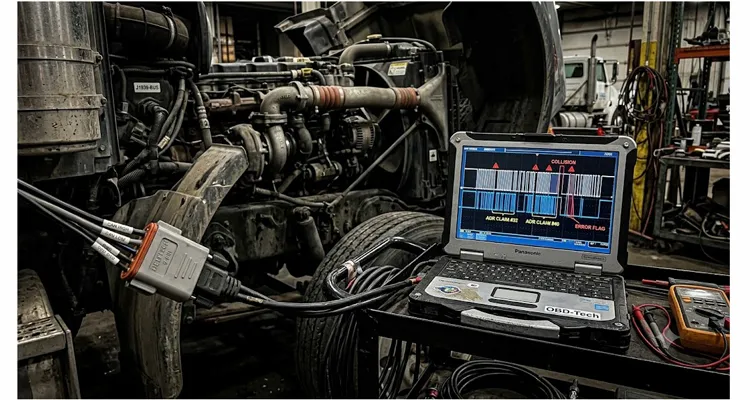
The call came in on a Thursday evening, the kind of call you take while holding a cup of coffee that’s already gone cold. A fleet technician in West Texas was trying to flash a calibration update onto a 2022 model year heavy-duty truck — a job that should be routine, but was spiraling into a J1939 source address conflict nightmare. Every time his J1939 pass-through adapter initiated the session, the engine ECU would reset, the service tool would throw a Communications Lost error, and the calibration counter would increment another notch toward a permanent lockout. He had already replaced the engine harness, swapped the diagnostic adapter twice, and reinstalled the OEM software on a fresh laptop. None of it helped.
I asked him one question: “When the adapter connects, what source address does it claim?”
There was a long pause. He hadn’t checked. Nobody ever checks.
That silence is where this post lives. I’ve logged more bench hours than I care to add up chasing J1939 communication faults that bottom out not in broken wires or bad ECUs, but in a very quiet, very deterministic fistfight: the Address Claim procedure. When it goes sideways during a calibration session, it can masquerade as corrupted files, voltage sags, defective controllers, or just plain bad luck. And because the real source address conflict is invisible unless you’re watching the CAN bus with the right tool, it eats days of diagnostic time and leaves a trail of unnecessarily replaced parts. That’s the phantom cost of network calibration faults I’ve written about — money spent on the wrong fix while the real culprit sits silently in the protocol.
Let’s walk through this the same way you’d explain it to a colleague standing next to the truck with a CAN sniffer already connected — starting with the exact J1939 arbitration sequence, then the traces you’ll actually see, and finally the steps that stopped the fight on a real job.
How a Routine Flash Turns into a Network Arbitration Fight
Picture this: You have a truck that runs fine in normal operation. The J1939 backbone carries routine traffic — engine speed, coolant temperature, aftertreatment status. No J1939 fault codes that point to a network issue. But the instant you put a pass-through device on the bus to run a calibration update, things fall apart. The service tool momentarily connects, then drops. Sometimes the engine ECU enters a fallback mode and throws an SPN 639 – J1939 Network #1 fault. Sometimes the calibration download starts, gets to seven percent, then hangs until a timeout resets the whole link.
What changed? The diagnostic tool arrived with its own source address requirement, and in many cases it attempts to claim an address that’s already occupied by a critical controller — often the very ECU you’re trying to recalibrate. The resulting address arbitration isn’t a bug. It’s the protocol working exactly as designed, and your calibration attempt is collateral damage.
Years ago, our engineering team was called to a mine site where a haul truck’s calibration session kept aborting without explanation. The transmission ECU and an aftermarket telematics gateway both insisted on Source Address 0x03. The vehicle ran, but the gateway would periodically drop off the bus and reconnect, writing its own address claim message each time. When the service laptop joined the network, the arbitration logic inside the engine ECU interpreted the chaos as a hostile takeover and deliberately suspended diagnostic sessions for safety. That’s not a defect — that’s functional safety doing its job.
How J1939 Source Address Arbitration Actually Operates
If you’re going to fix this without firing the parts cannon, you have to understand exactly what happens on the bus in the first three seconds after an ECU wakes up.
Per the J1939 standard, every controller that can dynamically claim an address must send an Address Claimed message (PGN 60928, identifier 0x18EEFF00). The 8-byte data payload of that message is the device’s 64-bit NAME. Think of the NAME as the ECU’s digital business card: it’s a 64‑bit identifier packed into the 8‑byte data field. The first bit tells you whether the controller can change its address at all. The next three are the industry group (on‑highway, ag, construction…), then come vehicle system instance, vehicle system, and function fields that together describe what this box does and where it sits in the vehicle hierarchy. Further down, the manufacturer code and identity number give each ECU a unique fingerprint. When two NAME values collide, the lower numerical value wins — a completely deterministic fight decided bit by bit.
The moment an ECU asserts its preferred source address inside that message, any other controller on the bus that already occupies the same address must compare NAME values. The controller with the lower numerical NAME value wins the address. The loser is required to send a new Address Claimed message with a different source address or, if it has no other address available, send a Cannot Claim Address message (PGN 60928 with a specific failure indication).
How the NAME Field Resolves J1939 Address Claim Conflicts
We’ve deliberately triggered source address conflicts on our test benches to study the exact failure signature. This is the same CAN bus arbitration mechanism that governs every frame’s priority on the physical layer, now applied to network membership. The whole fight is over in milliseconds. The arbitration is bitwise and ruthless. The problem with calibration sessions is that the diagnostic tool rarely plays this game gracefully. I’ve captured CAN traces — some from our own diagnostic adapter validation — where an off-the-shelf pass-through device simply kept hammering the same source address every 200 milliseconds, forcing repeated arbitration rounds and effectively drowning the bus in address claim traffic. The ECU, trying to maintain a stable diagnostic session, eventually triggers a Protection Value Fault and disconnects.
If you’ve ever seen an Error Passive state count climbing on your CAN monitor while a recalibration attempt was running, there’s a strong chance address claim contention is the root cause.
Catching the Fight in Real Time: What Your Diagnostic Toolkit Needs
Let me be blunt: you cannot diagnose a J1939 address claim conflict with a multimeter. Over the years, I’ve shipped CAN bus interfaces to customers just so they could see the battle unfolding on their own network. You need an interface that lets you observe raw identifier traffic without joining as an active participant — or at least one that can filter for Address Claimed messages specifically. I routinely use the following approach:
- Connect a CAN sniffer in listen-only mode across the J1939 backbone (pin C and D on the 9-pin Deutsch connector). A J1939 breakout cable makes this connection clean without disrupting the network. A PCAN-USB or Kvaser Leaf Light works well. Set the baud rate to 250 kbit/s.
- Set a hardware acceptance filter for identifier 0x18EEFF00 to isolate only Address Claimed messages. If your tool doesn’t support hardware filtering, capture everything and filter in software.
- Trigger a calibration session attempt as you normally would.
- Log the CAN trace for at least 30 seconds across multiple ignition cycles.
What you’re hunting for is two (or more) distinct NAME values appearing in messages that carry the same source address in the identifier. J1939 places the source address in bits 0–7 of the 29-bit CAN ID. If you see an engine ECU’s NAME arriving with source address 0x00, and then milliseconds later a completely different NAME from a diagnostic adapter also using source address 0x00, you’ve found your war zone.
Here’s a sanitized snippet from a real CAN log I reviewed for a customer who was unable to flash a DEF dosing controller:
| Time | ID | Data (NAME) | Notes |
| 0.000 | 0x18EEFF00 | A3 0C 45 00 00 00 80 1F | Engine ECU, SA=0x00 |
| 0.008 | 0x18EEFF00 | 00 00 00 00 89 01 00 00 | Diagnostic tool, SA=0x00 |
| 0.012 | 0x18EEFF00 | A3 0C 45 00 00 00 80 1F | Engine ECU re-claims SA=0x00 |
| 0.018 | 0x18EEFF00 | 00 00 00 00 89 01 00 00 | Tool re-claims again |
In that case, the diagnostic tool’s NAME was all zeros except for a manufacturer code — effectively the worst possible NAME to win an arbitration. The engine ECU had a proper NAME with a lower numeric value, so it kept winning, but the tool refused to back off. That repeated arbitration pushed the bus load above 60% on an otherwise quiet network, and the DEF controller’s calibration session failed before it even finished the security access handshake.
Recognizing Source Address Conflicts from CAN Bus Traces
One more thing: an oscilloscope on CAN_H and CAN_L can reveal the telltale waveform of error frames and retransmissions during these fights. If you see a thick band of activity every time the tool connects that looks nothing like normal periodic messaging, that’s your confirmation that the bus is in contention. If you want a deeper dive into interpreting those waveforms, our guide on reading J1939 waveforms like a pro walks you through it.
A Field‑Proven Sequence to Stop the Arbitration Fight and Get the Calibration Running
Once you’ve identified the conflicting source addresses and the devices involved, the resolution is usually straightforward. Here’s the sequence I follow on every job like this:
- Document the existing address map. Power up the vehicle without the diagnostic tool. Log all Address Claimed messages and build a table of source addresses, ECU descriptions (inferred from NAME fields), and whether the controller is Arbitrary Address Capable. This map tells you which addresses are already occupied and which are open.
- Look inside your service tool’s connection settings for a “Preferred Source Address” field — if you’ve never seen it, you’re not alone, but that one setting can change everything. Most OEM-level pass-through software allows you to specify this address, often under “J1939 Settings” or “Connection Properties.” Common defaults are 0xF9, 0xE0, or 0x01. Some low-cost adapters hardcode their source address and refuse to yield. If yours is one of those, you need a different adapter before you can proceed.
- Assign a free address to the tool. Choose a source address from the range 0x80 to 0xFC (the “service and diagnostic” range) that is not already in use. Make sure the address you select is not claimed by any other ECU in your map from Step 1, including intermittent devices like body controllers that may power up later in the sequence.
- Test the claim with the key-on sequence. With the tool configured, cycle the ignition off, wait until the bus goes silent, then turn the key back on. Watch the Address Claimed log. You should see the tool send its claim with the new address, and no other ECU should contend for it. The engine ECU and others should claim their usual addresses without retries.
- Launch the calibration session. Start the flash or calibration procedure. Monitor error frames. If you still see contention, check for a secondary interface — some telematics modules or data loggers also activate when a diagnostic request is detected, which can trigger a fresh round of claims. Disable those devices or force them to different addresses via their own configuration.
- Finalize the bus stability test. After a successful calibration, do at least three full ignition cycles while logging address claim traffic. If the map remains stable with no duplicate source addresses, the fix is solid.
5 Errors That Prolong the War
- Chasing termination resistors when the real fight is at the protocol level. When a customer reports a calibration fault, the first thing they usually checked was resistance across CAN_H and CAN_L. They saw something other than 60 Ω and swapped a terminator. I’ve watched teams do this twice before they’d even consider looking at address claims. Here’s why it fools them: some ECUs have internal termination that only kicks in when powered. You can chase an imaginary resistor problem for days while the real source address conflict chokes the bus. If the scope shows clean recessive/dominant levels and the bus isn’t completely dead, skip the resistor and grab a CAN sniffer for a NAME trace. (For a deeper look at how termination faults mislead diagnostics, see our analysis of the 23-cent resistor that causes fleet downtime.)
- Swapping ECUs without reading the NAME. We’ve supplied replacement controllers to fleets, and the first thing we tell them is to compare the NAME of the new unit. If the replacement has a higher numerical NAME priority, it loses the source address battle, and a previously stable network with Engine ECU at 0x00 and Transmission at 0x03 turns into a calibration fault generator. Now you’ve introduced a second problem on top of the original issue.
- Using a diagnostic adapter that ignores “Cannot Claim Address.” I’ve tested a pile of low-cost interfaces on our bench, and more than a few simply ignore the Cannot Claim Address requirement. They’ll keep hammering the same source address, flooding the bus with error frames. Our factory’s own diagnostic cables are designed with firmware that respects the full address claim state machine, but if you’re using a generic interface, check its behavior. If it won’t yield, no amount of software tweaking will fix it.
- Forgetting about address-capable ECUs that join late. A body controller that wakes up only when the door is opened might claim an address that your diagnostic tool already occupied quietly for ten minutes. Suddenly there’s a source address conflict. Always test with all loads active — fans, lights, wipers — to force every ECU to participate before you finalize your address map.
- Blaming the calibration file or the OEM server. A flash that repeatedly fails at the same block — say, 12% or 44% — smells like data corruption, so teams re‑download from the OEM portal and try again. I’ve had customers ship us their diagnostic adapter convinced the file was corrupt. When our team analyzed the CAN log, we saw the aftertreatment controller and the adapter fighting over source address 0x1A so heavily that the transport protocol couldn’t keep a session alive beyond the first few kilobytes. The file was fine; the network couldn’t shut up long enough to transfer it.
Confirming the Fix Is Genuine — Not Just Lucky
After you’ve resolved the address conflict and completed the calibration, don’t pack up your tools yet. A clean log during the session doesn’t guarantee the problem won’t return when the vehicle is in operation and other ECUs activate.
Run this checklist:
- Key cycle minimum ten times, logging Address Claimed messages each cycle. The address map must be identical every time.
- Induce a bus-off scenario by briefly disconnecting the diagnostic connector while the network is live, then reconnecting. Watch for any ECU that re-claims an address that conflicts with another.
- Monitor Error Counters over a 30-minute idle period with the diagnostic tool still connected but idle. TEC and REC should remain at zero.
- Perform a second, smaller calibration (like resetting an ash accumulation counter) to validate that the tool can reliably enter a diagnostic session without triggering a bus fight.
If the network passes those checks, the root cause is dead. You’ve earned that cup of coffee — this time, drink it hot.
Hardware That Prevents the Fight Before It Starts
After two decades of manufacturing J1939 diagnostic cables, I can tell you that most address claim issues that aren’t purely protocol-related trace back to the physical layer. A cable with inconsistent impedance, poor shielding, or a marginal pin fit can corrupt arbitration frames just enough to trigger repeated address claims. When a NAME bit flips due to reflection, the ECU misinterprets the conflict and cycles its own claim, destabilizing the bus.
I’ve personally measured cables that show a 5 Ω impedance bump right at the Deutsch connector overmold — enough to distort the edge of a CAN frame during arbitration. Our cables come from an IATF 16949 and ISO 9001 certified facility, with environmental management certified to ISO 14001. Every reel is tested with a VNA sweep to 500 MHz and a pin‑by‑pin continuity and short‑circuit check before it leaves, meeting the requirements of standards like ISO 1298-2. Shield termination is 360‑degree inside the backshell, not a drain wire dangling to a ring terminal. We use RoHS-compliant full-plastic overmolding, shielded twisted-pair construction, and solid Deutsch 9-pin connectors that maintain nominal impedance across the assembly. No mystery resistance changes after three months in a mining truck engine bay. No intermittent opens that look like protocol failures.
For clients running their own calibration fleets or building service tool kits, we provide OEM customization — custom lengths, wire gauge (AWG), connector types, color, branding, even pinout variations to match proprietary diagnostic interfaces. When your cable is part of a controlled test setup, you don’t have to wonder whether that last error frame came from a protocol clash or a dodgy conductor.
If the adapter and the wiring are both solid, the address claim procedure has the reliable transport it demands, and troubleshooting becomes ten times faster.
Frequently Asked Questions From the Trenches
What’s the difference between a source address conflict and a normal arbitration loss?
A normal arbitration loss is a clean, one-shot event: the loser picks a new address and the bus quiets down. An address claim conflict that triggers calibration faults is different — the losing device either can’t or won’t change its address, so it keeps re-asserting the contested one, creating continuous disruption on the J1939 network.
Can a J1939 address conflict damage an ECU?
No, the CAN controllers are built to handle bus contention. However, repeated calibration failures caused by a source address conflict can increment the ECU’s flash counter, and after a certain number of failed attempts, some ECUs permanently lock out reflashing. We’ve seen this on a few engine controllers.
Why does my diagnostic tool need a source address at all?
In any J1939 network, every transmitting node — including your diagnostic adapter — must have a unique source address. Without it, receivers can’t direct responses back to the tool. Think of it like a return address on a letter; the bus works on the same principle.
Does the engine ECU always use address 0x00?
Not always. While 0x00 is typical for the primary engine controller, we’ve encountered systems where the engine ECU sits at 0x01 due to address map design choices. Always capture an address claim trace before making assumptions, especially when dealing with OEM custom calibrations.
Is it safe to force a fixed source address on a tool?
Yes, if the address is genuinely empty. I favor the 0x80–0xFC range reserved for service tools, but I still verify against a live address claim trace before locking it in. Some OEMs assign addresses within that range for proprietary modules, and a quick check can save you from an intermittent calibration fault later.
Can a bad termination resistor cause an address claim conflict?
Only indirectly. A severe impedance mismatch might distort arbitration bits, causing an ECU to misread a NAME comparison and trigger a false conflict. But the vast majority of J1939 source address wars I’ve seen are pure protocol issues, not physical layer. Still, if your diagnostic cable is poorly shielded, you could see both problems at once — which is why we test every reel with a VNA.
How do I find my tool’s current source address without a bus monitor?
Some service software displays the active source address in a status bar or communication log. If yours doesn’t, a CAN sniffer is the only reliable method.
What if the conflicting ECU is one I can’t reconfigure, like a safety controller?
Then the only move is to change your diagnostic tool’s source address to an open one. Never force a safety-critical ECU into address renegotiation. We’ve helped customers resolve this by providing custom pinout cables that let them assign a fixed address on the adapter side without touching the vehicle network.
Can a telematics module cause address claim problems during calibration?
Absolutely. Many aftermarket telematics units wake up when they see diagnostic traffic and jump onto the bus with a hardcoded source address. We advise fleet managers to either temporarily unplug these modules or configure them to a non-conflicting address before starting any calibration session.
Is there an easy way to test for address conflicts before a calibration?
Connect a basic J1939 monitor and initiate a diagnostic request. If you see more than three address claim messages within a 500-ms window after the tool connects, you likely have a conflict that needs addressing before you launch the full calibration.
When You’ve Fought Enough Address Wars Alone
If you prefer a visual guide, our J1939 calibration fault troubleshooting flowchart lays out the same logical progression. Most of the time, an address claim conflict is an hour-long fix once you have the right trace and a clear address map. But there are edge cases — proprietary ECUs with locked-down addresses, complex multi-segment networks, adapters with buggy firmware — where you need a second set of eyes that have seen the same war before.
If you’re chasing a calibration fault that smells like an address claim problem but won’t yield, our engineering team does this every day. We work directly with fleet maintenance groups, calibration tool builders, and OEM validation teams to reproduce the exact bus conditions and specify the right interface hardware. Whether you need a custom harness that eliminates noise-induced arbitration repeats or just someone who can read a raw CAN log and tell you exactly which ECU is being stubborn, reach out.
Chat with us on WhatsApp: Start a conversation
Or send a message through our contact page: Contact Form
We don’t sell with hype. We solve problems, manufacture the cables that handle the conditions, and get your calibration sessions back on schedule. OEM customization, rigorous testing, and two decades of factory experience are standard here — not extra line items.
