

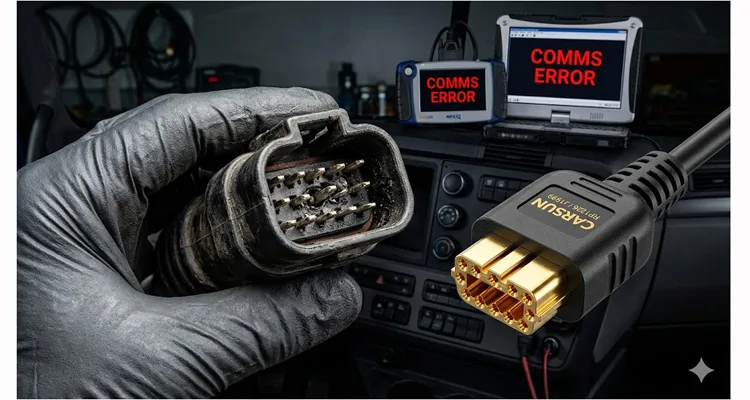
The fleet manager’s email had one line: “Truck 4417, dead. Bay 3. Need a second opinion.” The work order said “No-start, possible ECM.” Three hours and a new ECU relay later, the problem was untouched. The truck—a 2020 Freightliner Cascadia with a Detroit DD15—was still taking up Bay 3.
The technician, a 10-year veteran, was frustrated. He’d verified the inertia switch, checked battery voltage, and even swapped the ECU relay as a precaution. The scan tool—a Detroit Diesel Diagnostic Link (DDDL) interface—showed a Nexiq USB Link with a flashing red LED: Link LED solid, but the Activity LED dead. We swapped drivers, swapped laptops, and then I noticed the connector shell was hot to the touch from a short. That heat told me we weren’t dealing with a software glitch; we had a physical layer short drawing current somewhere in the diagnostic cable. This specific symptom—heat at the connector—is something we’ve documented in our internal failure analysis reports as a classic indicator of a cold weld or crimp failure creating high resistance.
The problem wasn’t the DD15. It wasn’t the main chassis harness. It was the RP1226 diagnostic port, and specifically, the 14-pin diagnostic cable plugged into it. We encounter this exact failure signature often enough that our field service protocols now prioritize cable integrity verification before any ECU troubleshooting, a systematic approach we developed to diagnose intermittent CAN bus failures.
The Real Failure Point: It’s Not Just “Broken”
The RP1226, or the 14-pin Deutsch diagnostic connector on Freightliner, Western Star, and some Thomas Built buses, is the single gateway to the vehicle’s electronics. When you lose communication here, you lose everything: engine data, transmission controls, ABS codes, and telematics. The truck becomes a $150,000 brick. This isn’t theoretical—we’ve worked with fleets where a failed RP1226 connection caused a full telematics outage across multiple trucks, leading to compliance headaches and missed revenue.
In Bay 3, the symptom was intermittent. Jiggle the diagnostic cable, and communication flickered on. Let it go, and it died. The initial thought was a broken pin in the vehicle-side receptacle. That means dashboard removal, wiring diagram tracing, and hours of labor—easily a $1,500 bill before parts, plus the truck sitting dead. A DOT officer would also flag a damaged diagnostic port during a roadside inspection, leading to an out-of-service order. We’ve seen this exact scenario play out in shops from Atlanta to Edmonton, often leading to unnecessary repairs.
But the root cause wasn’t the truck’s port. It was the aftermarket “universal” cable the shop bought online for $12. We’ve seen this pattern enough times to know where to look first. The truck’s diagnostic port was fine; the cheap cable was the problem. This case study echoes what we covered in our analysis of heavy-duty diagnostics and 9-pin connector failures , where the cable was the hidden culprit.
The Engineering Behind the $15 Solution
We pulled the suspect cable and looked at the Deutsch HD10 series connector—the industrial standard for these ports. Under a loupe, the failure was obvious. Two of the male pins in the cable connector had been over-crimped at the factory, crushing the internal strands of wire. Vibration had finished the job, causing an open circuit inside the insulation. Worse, the contact retention force was low—the pins could be pushed back into the connector housing with light finger pressure. That “spongy” feel is a dead giveaway of a substandard crimp. In our lab, we’ve documented how these failures occur when crimp height isn’t controlled, a topic we explored in depth in our guide on crimp vs. solder vibration reliability .
Here’s the difference a proper, factory-engineered $15 cable makes:
Terminal Retention
An OEM-grade cable uses original Deutsch contacts. We validate contact retention using a tensile tester set to a pull rate of 25mm/min, per USCAR-2 standards . Cheap pins often fail below 40N after a single insertion, which you’ll feel as that “spongy” connection. Proper retention (typically > 60N) ensures the pins lock firmly into the connector’s cavity and grip the vehicle-side receptacle pins with consistent pressure. This isn’t just about feel; it’s about maintaining low-resistance contact over thousands of vibration cycles.
Wire Gauge and Stranding
The RP1226 port handles both J1939 (high-speed CAN) and J1708 (legacy data). According to the SAE J1939 standard , the physical layer is defined for 250 kbit/s operation using CAN-based communication. That impedance mismatch isn’t just a lab number. On a long wheelbase, a mismatched cable acts like a boulder in a stream—it causes signal reflection. The data packets collide, and the ECMs see “frame errors.” The result isn’t a clean “no communication” fault; it’s intermittent data dropouts that make telematics look like the truck is vanishing from the map for minutes at a time. We use exact AWG stranded tinned copper to prevent signal reflection and data loss. The cable in Bay 3 used undersized, brittle wire that snapped internally. We’ve dissected enough of these to know the copper stranding count is often half of what it should be. For technicians dealing with older trucks, understanding J1708 diagnostics and legacy support is critical, as both protocols share the same physical cable.
Overmolding vs. Assembled
A low-quality cable often uses a cheap backshell that screws together. These come loose. An engineered cable uses a strain-relieved overmold or a rigid backshell design that clamps the cable jacket, not just the individual wires. We’ve seen backshells literally fall off in a driver’s hand, taking the pins with them. This kind of failure is exactly why we emphasize full-plastic design and robust strain relief in harsh environments.
Step-by-Step: How to Confirm the Real Problem
If you have a Freightliner with intermittent or dead comms, don’t start by condemning the truck. Follow this isolation protocol. We’ve used this exact sequence in hundreds of field service calls, and it’s saved countless hours of misdiagnosed labor.
1. Visual Inspection
- Vehicle Port: Check the 14-pin receptacle (usually near the driver’s seat base or under the dash on the firewall). Look for pushed-in, bent, or corroded pins. If pins look perfect, move to the cable.
- Cable Connector: Inspect the male pins in your cable. Are they evenly spaced? Any sign of melting (from shorted pins)? Use a pick tool to gently try and push each pin backwards. If any move, the connector is failing.
2. The Wiggle Test (With Intent)
- Connect your diagnostic tool. Establish communication if possible.
- Grasp the cable near the connector head and wiggle it gently in different directions. If the tool drops communication, you have a physical layer fault in the cable or its crimp connections. This is often the first sign of a 9-pin Deutsch connector issue, even when using an RP1226 adapter.
3. The Multimeter Check
- Set your meter to continuity/ohms.
- Probe the back of the cable connector pins and the corresponding pins at the other end (often a 9-pin Deutsch or USB).
- Critical Check: Measure resistance from pin to pin. A good crimp will show near 0 ohms. A failing crimp or broken strand will show fluctuating or high resistance. Check pins 4 (J1939 +), 5 (J1939 –), and 6 (J1708 +), 7 (J1708 –). High resistance here guarantees packet loss. We’ve documented how to diagnose intermittent CAN bus failures using this exact method.
How a Proper Cable Prevents DOT Fines and Downtime
A DOT officer inspecting a commercial vehicle checks for “tampering or disabling of required safety systems.” The diagnostic port falls under this umbrella. If the connector is damaged to the point that a roadside inspector cannot plug in their own device to check hours-of-service or ABS status, that can be a violation. We’ve seen fleets hit with DOT fines simply because a cheap cable damaged the truck-side port, leading to an out-of-service order.
Using a mechanically sound, OEM-spec cable from a direct factory source with proper strain relief ensures:
- Reliable Telematics: Your ELD or telematics device stays online, ensuring Hours of Service (HOS) compliance data is transmitted correctly. A failed RP1226 connection can cause J1939 cable ELD compliance audit failures, which we’ve analyzed in depth.
- Passing Inspection: The connector latches securely, with no missing or recessed pins.
- Rapid Diagnostics: When a problem does happen, you can plug in immediately and get accurate data, not spend hours chasing ghost faults.
The Factory Difference: Why We Don’t Make “Universal Junk”
At our facility, we don’t just “assemble” cables. We recently had a client whose telematics units were failing in Northern Alberta. The standard PVC jacketing was shattering at -40°C. We swapped the entire run to a custom TPE (-50°C rated) jacket, increased the wall thickness by 0.3mm for abrasion resistance against ice buildup, and requalified the assembly. That’s what “OEM customization” means in practice. We’ve applied this same engineering rigor to solving mining and welding interference problems and agricultural equipment durability challenges.
This is backed by our manufacturing protocols:
Certified Processes
Our IATF 16949 certification means our crimp pull-test data is traceable by batch number. If a cable from 2022 fails in the field, we can tell you which operator was on the line and which reel of wire was used. That’s how we closed the loop on the over-crimping failure I mentioned earlier. We also operate under ISO 9001 and ISO 14001 . This level of traceability is what enables our zero-defect cable process .
20+ Years of Direct Factory Experience
We’ve seen every failure mode. Over-crimping, under-crimping, incorrect insulation stripping—these are known enemies we’ve engineered out of our process. Our team has performed countless forensic analyses on wiring harness failures , from reefers to heavy-duty trucks.
OEM Customization as Standard
We don’t just stock standard cables. We provide engineering support for OEM customization: Logo, brand, length, color, and specific AWG requirements. If your telematics box needs a 3-meter cable with a specific 90-degree boot to clear a seat bracket, we can build it. We understand the true cost of custom cables and work to optimize designs for manufacturability.
100% Testing, Not Sampling
Every single cable undergoes a 4-step quality inspection: incoming wire test, in-process crimp monitoring, final assembly continuity, and a hi-pot test where required. This is non-negotiable.
Environmental Controls
Components are stored in a climate-controlled warehouse under 5S management, preventing the corrosion and contamination that plague standard inventory.
A $15 cable from us isn’t “cheap.” It’s target-priced to eliminate downtime. The material cost is higher—we use full-plastic design (RoHS standard) housings that won’t crack, and we gold-plate critical pins for signal integrity. The $12 cable from an online reseller is built to a price. Ours is built to a standard: CE, UL, and REACH certified materials that won’t outgas or fail in the field.
Related Products for the RP1226 System
If you’re building a diagnostic kit or replacing fleet cables, these are the engineered alternatives:
- Standard RP1226 to J1939 (Deutsch 9-pin) Cable: For connecting most heavy-duty scanners.
- RP1226 to USB Cable: Direct laptop connection for programming and datalogging.
- RP1226 Breakout / Y-Cables: For permanently installed telematics, allowing a pass-through connection so you can plug a scanner in without disconnecting the modem.
Frequently Asked Questions: The Physical Layer of Freightliner Diagnostics
Q1: My scanner works on every other truck but not my 2022 Freightliner. Is the truck’s ECU bad?
A: Unlikely. Start by checking the cable. If the cable has damaged pins or broken wires inside the insulation, it will work on some trucks with tighter ports and fail on others. It’s a mechanical tolerance issue. This is covered in our fleet manager’s guide to OBD2 port no-communication issues.
Q2: What’s the difference between J1708 and J1939 on the RP1226 port?
A: J1708 (pins 6 & 7) is the older, slower (9600 baud) protocol for basic engine data. J1939 (pins 4 & 5) is the high-speed (250k baud) CAN bus for modern ECUs. The SAE J1939 standard defines the physical layer at 250 kbit/s and has been widely adopted by diesel engine manufacturers. A failing cable can knock out one or both, depending on which pins are damaged. For deep dives, see our J1708 diagnostic guide for older Freightliners and J1939 Type 1 vs Type 2 guide .
Q3: The pins in my cable connector push back when I try to plug it in. Can I fix that?
A: I’ve seen techs spend 20 minutes with a pick trying to re-tension those pins. The reality is the stamped metal spring in the cavity has yielded—it’s like bending a paperclip back and forth. It won’t hold. Replace the cable. That 20 minutes of labor is already more expensive than the new cable.
Q4: Will a bad cable trip a check engine light?
A: Indirectly, yes. If the ECM loses communication with the Transmission ECU or ABS module due to a physical layer fault (bad cable), it will log a network-related fault code, like a SPN 639 (Lost Communication with TCM).
Q5: Why are your cables more expensive than Amazon Basics?
A: Price is the cost, value is what you avoid. We’ve cut open enough “Amazon Basics” cables to know the contacts are often generic clones with poor plating that corrodes internally. You can’t see that corrosion, but you’ll feel it when the truck won’t start at 4 AM. We use Amphenol or original Deutsch contacts because the 2-cent savings isn’t worth a tow bill. We’ll sell you one good cable, not three that fail.
Q6: I need a cable with a specific connector on the other end for my prototype telematics device. Can you help?
A: Yes. Direct factory engineering support is our core competency. We can work from your pinout and mechanical drawings.
Q7: What is the most common cause of RP1226 port failure on the vehicle side?
A: Technicians forcing a bent pin or a cheap, out-of-spec cable into the port. The truck port is rarely the first thing to fail; it’s usually the victim of a bad cable insertion.
Q8: Does CARSUN have the IATF 16949 certification?
A: Yes, we are certified. It’s a requirement for our work supplying assembly lines for major automotive manufacturers. It dictates our entire quality control philosophy, from incoming inspection to final packaging. You can view our IATF 16949 certification and ISO 14001 certification online.
Q9: What does “full-plastic design” mean for a diagnostic cable?
A: It means we avoid potted or glued strain reliefs. We use engineered plastic overmolds or backshells that provide consistent clamping force without deforming, ensuring the cable lasts for tens of thousands of flex cycles.
Q10: Can a bad RP1226 cable cause a no-start?
A: On modern electronically controlled diesels, absolutely. If the ECM cannot communicate with the Immobilizer module or the CAN network is corrupted by a short in the diagnostic cable (a broken wire touching power or ground), the ECM may inhibit starting.
Need a Solution That Won’t Fail Next Tuesday?
If you’re a fleet manager, a diagnostic tool developer, or a maintenance professional tired of chasing ghost faults, we should talk. Don’t let a $15 problem cost you a day of downtime and a potential DOT violation. Use our diagnostic downtime cost calculator to see what these failures really cost your operation.
If you’re looking at a connector pinout right now and the datasheet isn’t clear, send it to us. If you have a prototype that needs a custom boot to fit a tight firewall, let’s talk. We’ll tell you if it’s feasible, what the lead time looks like, and what the engineering challenges are—no fluff, just a straight answer from the factory floor.
📞 Have a specific RP1226 pinout question? Message us on WhatsApp directly: +86 17307168662 (Ask for Linda, Senior Sales Engineer). It’s usually the fastest way to get a schematic or a yes/no on a custom build.
📧 Or use our Contact Page for detailed inquiries and drawings.
We don’t just sell cables. We solve connection problems.
